Experiment example (Psychtoolbox): Cued left/right button press
Description
A motor experiment for the KIT MEG system. A low-contrast arrow appears at the fixation dot and the participant presses a button with the hand it points to: left box = left hand, right box = right hand (any button on the box). It gives lateralized movement-related fields, cue-evoked responses, accuracy and reaction times. Because the only visual event is a small, low-contrast arrow on a mean-grey screen, it is suitable for participants with epilepsy.
Code:
experiments/psychtoolbox/button_press_lr
(start with main.m).
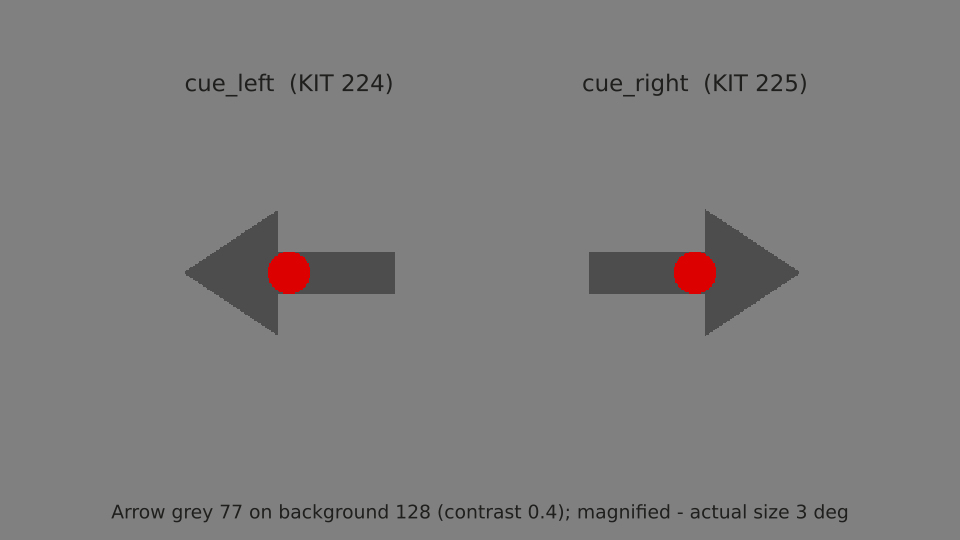
The two cues (magnified). Default: 3 deg arrow, grey 77 on background 128.
Left and right cues are equally frequent, in a constrained random order (never more than three of the same hand in a row). Cue onsets are jittered uniformly between SOA min and max, and the run length is still exact (the SOAs are evenly spaced and shuffled).
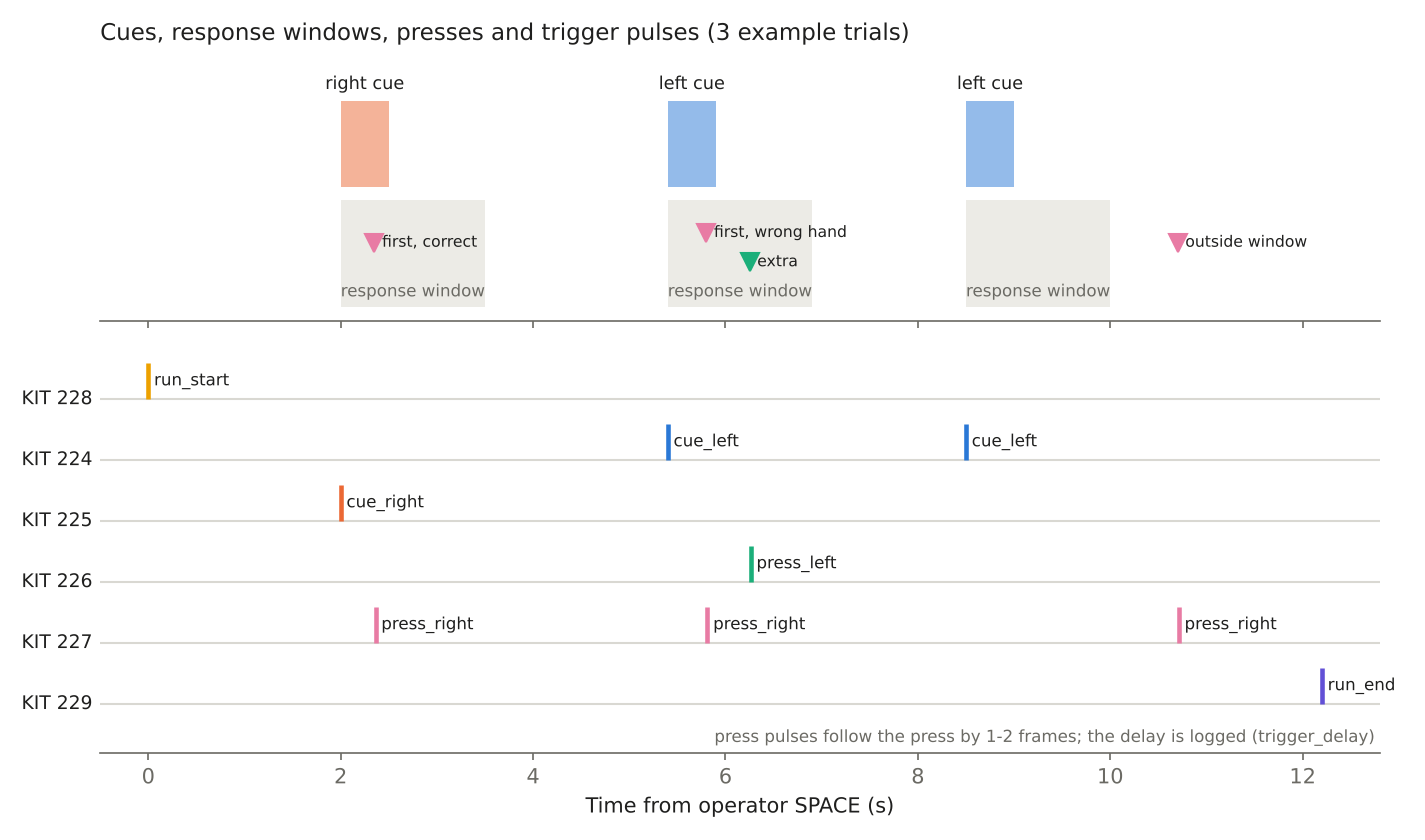
Each cue is shown for 0.5 s; presses within the 1.5 s response window are scored. Every press, wherever it falls, gets its own trigger.
Responses and triggers
Trigger protocol
Single-channel DataPixx pixel mode, same RGB codes as trigger_template.m.
Event |
KIT channel |
MNE channel |
Pixel RGB |
When |
|---|---|---|---|---|
|
224 |
|
|
First frame of a left arrow |
|
225 |
|
|
First frame of a right arrow |
|
226 |
|
|
First free frame after a left-box press |
|
227 |
|
|
First free frame after a right-box press |
|
228 |
|
|
Start of the 2 s baseline |
|
229 |
|
|
End of the last SOA (completed runs only) |
Timing robustness on the stimulus PC
30 trigger-free warm-up frames (0.25 s,
cfg.warmupFrames) follow SPACE before the run-start pulse. The first flips after the start screen can return a bad timestamp on the stimulus PC (PTB “beamposition timestamping computed an impossible stimulus onset”); the warm-up keeps that away from every trigger frame.Every timing check outside tolerance is logged in the
*_okcolumns and printed as a warning. Timing never stops a run.A pulse whose flip timestamps give less than half a frame (impossible for a 1-frame pulse) is a timestamp error, not a trigger error: it is counted in
RunInfo.n_timestamp_anomaliesinbeh.jsonand never stops the run.
The run is a continuous frame loop at 120 Hz. Each trigger lasts one frame, and two trigger frames are never adjacent, so pulses on the same channel can never merge. A press trigger therefore goes on the first frame that:
is not next to another trigger frame, and
does not precede a cue or
run_endframe.
That is normally 1-2 frames (8-17 ms) after the press. The exact delay from the
press to its trigger frame is logged as trigger_delay. The onset-filling
script subtracts it, so a press row’s onset is the moment the button went
down. A press in the last two frames before run_end gets no trigger. It
stays in the press log but not in events.tsv.
Safety and design limits
Hard limits in cfg.safety of
button_lr_config.m,
enforced in the launcher and at the start of every run:
Parameter |
Default / limit |
Why |
|---|---|---|
Arrow contrast |
0.4 / 0.1-0.6 |
Low contrast; mean grey background never changes. |
Arrow size |
3 deg / 0.4-6 deg |
Central cue (under 1 % of the screen at the 6 deg limit). |
Cue duration |
0.5 s / 0.2-2.0 s |
|
Response window |
1.5 s / at least 0.5 s and at least the cue |
Must end at least 0.5 s before the next cue. |
SOA (jittered) |
3-4 s / 1.5-10 s |
At most 0.67 cues per second; time for motor fields to settle. |
Run length |
at most 15 min |
The screen is otherwise static. Psychtoolbox splash screens are disabled and the screen fades to black over 2 s before the window closes, so set the projector desktop background to black.
Running the experiment
The console prints a progress line after each trial (Trial 17/80 done, 63
left, about 3 min 41 s to go). A run stopped early keeps the standard file
names with RunStatus aborted in beh.json; events.tsv has
exactly one row per trigger actually sent, so its onsets can be filled from the
MEG recording and the completed trials analysed.
cd experiments/psychtoolbox/button_press_lr
main              % launcher (production preset selected)
main('validate')  % headless self-test, no Psychtoolbox needed
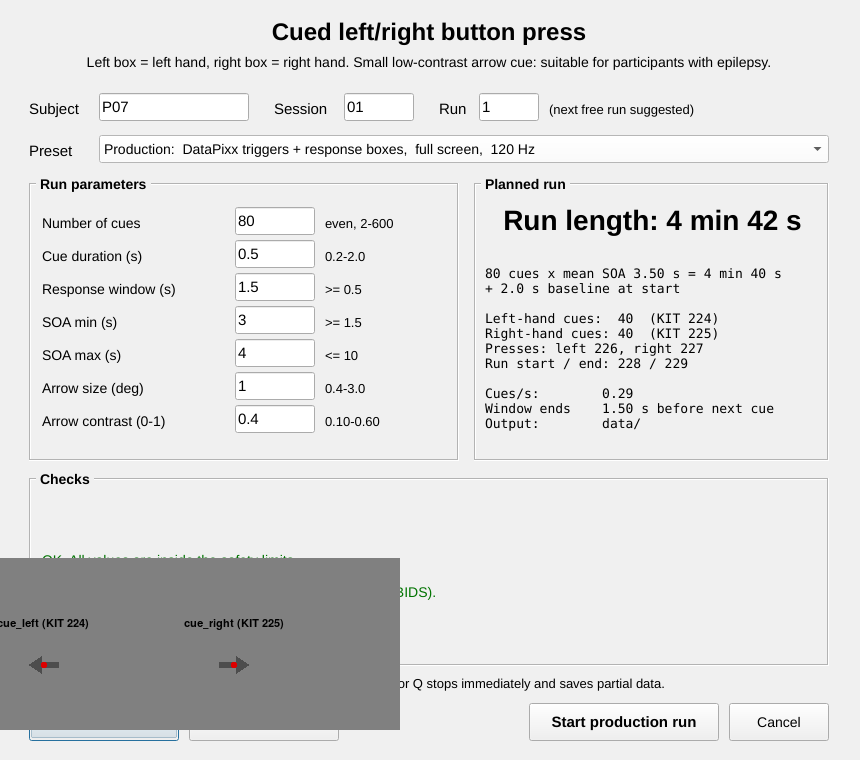
The launcher recomputes the run length whenever a value changes (press Enter or Tab). Preview cues shows both arrows. A production start asks for confirmation that KIT recording is running and both boxes are connected.
Preset |
Responses |
Display and checks |
Output folder |
|---|---|---|---|
Production |
Response boxes (DIN log) |
DataPixx triggers, full screen, 120 Hz, timing logged, never fatal |
|
Full rehearsal |
Keyboard F / J |
No DataPixx, full screen |
|
Debug |
Keyboard F / J |
Windowed, 50 px trigger patch, faults logged only |
|
run length = 2 s baseline + nTrials x (SOA min + SOA max) / 2
Cues |
Run length (SOA 3-4 s) |
Note |
|---|---|---|
40 |
2 min 22 s |
|
80 |
4 min 42 s |
Default (40 per hand) |
120 |
7 min 02 s |
|
200 |
11 min 42 s |
Scripted launch (limits still apply):
spec = struct('subject', 'P01', 'session', '01', 'mode', 'debug');
spec.params = struct('nTrials', 10);
main(spec)
Before the session
Connect both response boxes and test them (see the response-box page).
Run
main('validate')after any change to the code or configuration.Check channels 224-229 with test_all_meg_channels_triggers.m if the setup or wiring changed.
Explain the task; a short debug run with the keyboard is a good practice block.
Start KIT acquisition, then press SPACE.
Saved data (BIDS)
data/
  dataset_description.json, README
  sub-P01/ses-01/meg/sub-P01_ses-01_task-buttonlr_run-01_events.tsv / .json
  sub-P01/ses-01/beh/sub-P01_ses-01_task-buttonlr_run-01_beh.tsv / .json
  stimuli/task-buttonlr/cue-left_size-300deg_contrast-040_h-<hash>.png (and right)
  sourcedata/sub-P01/ses-01/beh/..._desc-presses_beh.tsv        (every press)
  sourcedata/sub-P01/ses-01/beh/..._desc-snapshot_beh.mat, ..._desc-matlabconsole_log.txt
events.tsv has one row per trigger pulse, sorted by pulse time.
Column |
Content |
|---|---|
|
|
|
Cue rows: measured arrow duration. Other rows: 0. |
|
Event name and KIT channel (value = channel). |
|
Cue rows: the cued hand. Press rows: the hand that pressed. |
|
Cue number; for press rows, the trial whose window contained the press (0 = outside). |
|
Press rows: |
|
Cue rows: 1/0 for the response, |
|
Press minus cue onset on the DataPixx clock (s). |
|
Box and colour (or keyboard key). |
|
Cue image in |
|
Trigger frame time minus run-start frame time (stimulus PC). |
|
0 for cues and run markers; press-to-trigger-frame delay for presses. |
|
1 when DataPixx pixel mode was active. |
events.json describes every column. It also holds:
"TriggerMode": "single_channel", the channel table and the expected pulse count per channel;the trigger definitions and the onset rule;
the response device, response clock and button mapping;
the cue geometry;
RunStatusandRunComplete.
beh.tsv has one row per cue: planned and actual onset, cue duration, pulse
check, the response (hand, button, RT, correct), the number of presses in the
window, and the DataPixx marker. beh.json adds a summary (correct, wrong
hand, missed, median RT). The desc-presses table in sourcedata lists
every press, including any whose trigger was never drawn because the run
ended or was aborted first.
Preprocessing
python experiments/psychtoolbox/button_press_lr/fill_events_onsets.py \
    --events data/sub-P01/ses-01/meg/sub-P01_ses-01_task-buttonlr_run-01_events.tsv \
    --raw    <recording>.con \
    --out    <BIDS root>/sub-P01/ses-01/meg/sub-P01_ses-01_task-buttonlr_run-01_events.tsv
The script matches every logged pulse one-to-one with the recorded pulses (lab
detector, MISC 001-MISC 008) and sets onset = pulse - trigger_delay.
It refuses to write anything on any mismatch. Run it after MNE-BIDS conversion.
Motor fields: epoch on
press_left/press_rightrows withresponse_type == firstandcorrect == 1. These onsets are the button presses themselves.Cue responses: epoch on
cue_left/cue_rightrows and add the projector lag (+8.36 ms).
Validation
main('validate') checks:
the trigger map, presets and limits, and 9 refused settings;
DIN decoding: rising edges, held buttons, masking and polarity;
press classification (
first/extra/outside, correct, RT);cue geometry, direction and contrast;
120 random schedules;
every output file for a completed and an aborted run.
During development the frame loop was exercised against a simulated 120 Hz Psychtoolbox and DataPixx with a scripted participant. The participant made a correct response, a wrong-hand response, a miss, an extra press and an out-of-window press, in both DIN-log and keyboard mode, and also during an abort. The simulation checked that:
every pulse lasted one frame, and no two trigger frames were adjacent;
each arrow was visible for exactly 60 frames;
the pulse sequence matched
events.tsv;RTs and trigger delays were exact, even with every third DataPixx marker latched a frame early;
the onset-filling script put press onsets within 0.33 ms of the true press times (1 ms sampling).
Confirm on the rig with a recorded rehearsal before the first participant.