Experiment example (Psychtoolbox): Attention task, Worden et al. (2000) replication
Author: Hadi Zaatiti <hadi.zaatiti@nyu.edu>
Description
A trial-by-trial spatial cueing task for the KIT MEG system that reproduces the task of [Worden2000b]. A brief arrow at fixation tells the participant which side to attend; one second later a shape appears on the left or on the right, and the participant presses a button only if the target shape appears on the cued side. The paper reports that, in the last 250 ms before the shape, alpha-band (8-14 Hz) activity is higher over the occipital cortex ipsilateral to the cued side.
It replaces the block-cued Attention Task for testing that effect: attention is cued on every trial, the participant has a task at the attended location, and both cue directions are mixed in one recording.
Code:
experiments/psychtoolbox/attention_task_worden
(start with main.m).
Worden MS, Foxe JJ, Wang N, Simpson GV. Anticipatory biasing of visuospatial attention indexed by retinotopically specific alpha-band electroencephalography increases over occipital cortex. J Neurosci. 2000 Mar 15;20(6):RC63. doi:10.1523/JNEUROSCI.20-06-j0002.2000 (free full text on PubMed Central)
The trial
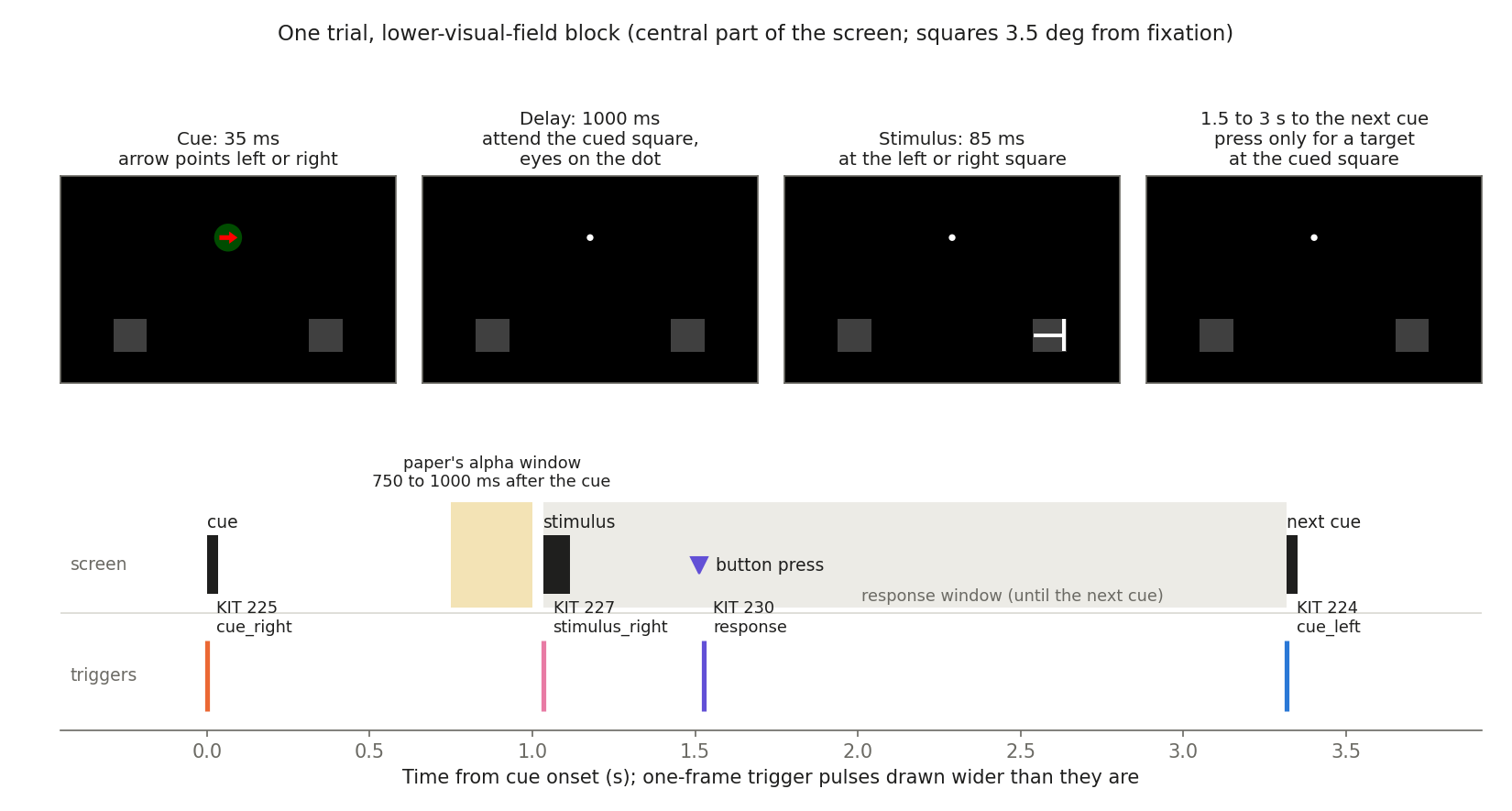
One trial of a lower-visual-field block, and its trigger pulses.
The screen is black, with a white fixation dot and two dark grey squares (location markers, 1.2 deg) 3.5 deg left and right of fixation. The squares stay on screen for the whole block. In different blocks they are 3.5 deg above or 3.5 deg below the horizontal meridian.
Cue, 35 ms. A 1 deg red and green disc with an arrow replaces the fixation dot. The arrow points left or right with equal probability. The colours are swapped at random (red arrow on green, or green arrow on red).
Delay, 1000 ms. Fixation dot and squares only.
Stimulus. A shape appears at the left or the right square with equal probability, whatever the cue said.
Orientation blocks: a letter T in one of four orientations, for 85 ms.
Motion blocks: a dot for 30 ms, 15 ms blank, a second dot for 30 ms, which looks like one dot jumping up, down, left or right.
1.5 to 3 s (uniform) before the next cue.
The cues and the two sets of four stimuli (magnified).
The task
One of the four stimuli is the target of the block. The participant presses a button with the right hand, as fast as possible, only when the target appears at the square the arrow pointed to. A shape at the other square is ignored, even if it is the target. Most trials need no press.
Blocks and runs
A block has 16 trials: every stimulus (4) x cue side (2) x stimulus side (2) once, in random order. Then each trial has a 0.1 probability of being replaced by a target at the cued side, so the number of targets per block is not fixed (two, plus the extra ones).
A run has 8 blocks by default: each task (orientation, motion) x visual field (upper, lower) twice, in random order. A block lasts about one minute; a run about 8 to 9 minutes with its instruction screens.
One run gives 64 trials per cue side. The paper does not give its number of trials. Four runs (256 trials per cue side) take about 40 minutes.
What the participant reads
Every run starts with three instruction screens:
what happens in a trial (arrow, attend that side, shape in one square) and that the eyes stay on the centre dot;
when to press (shape at the cued square and it is the target) and when not to (other square, or not the target);
what to expect: most trials need no press, the task is difficult, blocks last a minute, the target changes between blocks.
Before every block a screen names the shapes of the block, says whether the squares are in the upper or lower part of the screen, and shows the target and the three non-targets as drawings. Any button of the response boxes continues. After the instructions the screen shows “Please wait for the experimenter” until the operator presses SPACE.
The wording is in worden_instructions.m.
Red and green of the cue
The paper matched the luminance of the red and the green for each
participant by flicker photometry. Flicker calibration… in the
launcher does this: a 2 deg disc at fixation alternates between red and
green 15 times per second; the participant makes the green brighter (right
box) or darker (left box) until the flicker is weakest; the operator
presses SPACE. The value is saved for that participant and session
(calibration/sub-<label>_ses-<label>_flickerphotometry.json) and used by
every later run. Without a calibration the cue uses a nominal green (76 of
255) and a production start asks for confirmation.
Warning
The flicker calibration is a small red/green flicker at 15 Hz. Do not run it with a participant who has, or may have, photosensitive epilepsy. The launcher asks for confirmation before it starts.
Responses and triggers
Trigger protocol
Single-channel DataPixx pixel mode, same RGB codes as trigger_template.m.
Event |
KIT channel |
MNE channel |
Pixel RGB |
EyeLink xDAT |
When |
|---|---|---|---|---|---|
|
224 |
|
|
1 |
First frame of a cue pointing left |
|
225 |
|
|
2 |
First frame of a cue pointing right |
|
226 |
|
|
3 |
First frame of a stimulus at the left square |
|
227 |
|
|
4 |
First frame of a stimulus at the right square |
|
228 |
|
|
5 |
First frame of the fixation dot and squares of a block |
|
229 |
|
|
6 |
After the response window of the last trial of a block |
|
230 |
|
|
7 |
First free frame after a right-box press |
Every pulse lasts one frame. A run of 8 blocks has 128 cue pulses (224 + 225), 128 stimulus pulses (226 + 227), 8 pulses on 228, 8 on 229 and one on 230 per press.
Visual field, task, target, stimulus identity and outcome are not in the trigger. They are in the
events.tsvrow that the onset-filling script aligns with each pulse.A response pulse is sent on the first free frame after the press, at least 9 frames before the next cue or stimulus. The delay is logged as
trigger_delay; response times come from the button log, not from the pulse.DataPixx pixel mode is switched on only once a black trigger pixel is on screen, and the eye-tracker calibration runs before that, so neither can raise a trigger line.
Eye tracker
The EyeLink is set up as in MSWM/MEG_metacog.m: black background, white
targets, HV9 calibration on the central 50 % of the screen, EDF file opened
under an 8-character name, xDAT 110 and StartRecording at the start,
one xDAT <code> message on the first frame of every event (table
above), xDAT 111, StopRecording and ReceiveFile at the end. The
paper rejected trials with eye movements from the EOG; use the EDF for that.
Running the experiment
cd experiments/psychtoolbox/attention_task_worden
main              % launcher
main('validate')  % headless self-test, no Psychtoolbox or devices needed
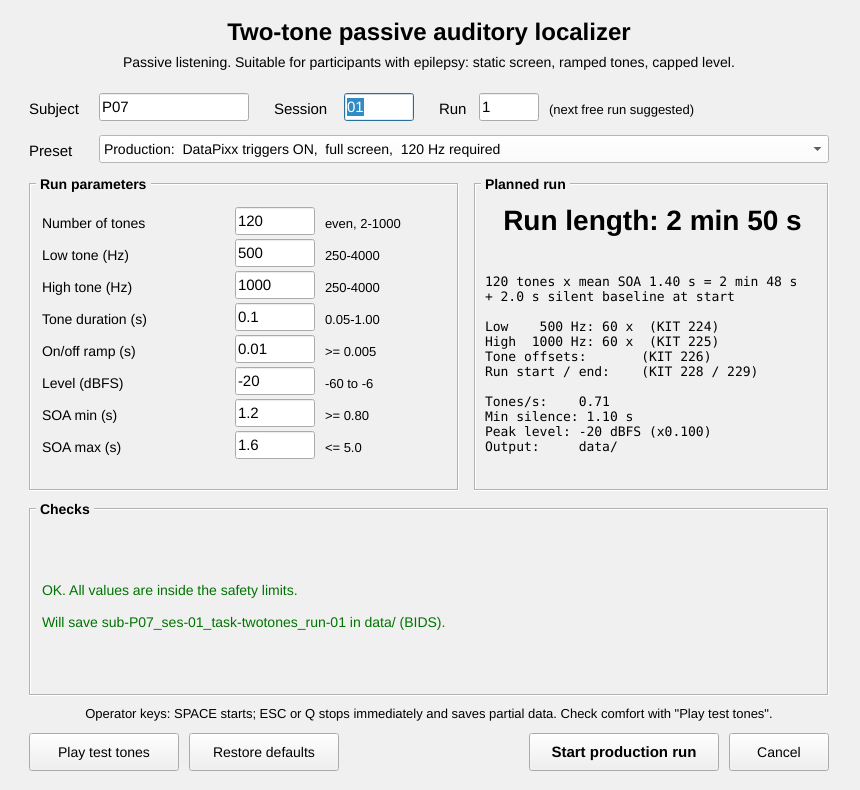
The launcher. The status line says whether the run is a production run
(saved in data/) or a test (saved in data_rehearsal/).
Preset |
Responses |
EyeLink |
Display |
Blocks |
|---|---|---|---|---|
MEG production, with EyeLink |
Response box |
on |
Full screen, triggers |
8 |
MEG production, without EyeLink |
Response box |
off |
Full screen, triggers |
8 |
Practice in the MEG |
Response box |
off |
Full screen, triggers |
2, feedback after each block |
Trigger test |
Response box |
off |
Full screen, 50 px trigger patch |
2 |
EyeLink test |
Keyboard J |
on |
Full screen, no DataPixx |
2 |
Full rehearsal |
Keyboard J |
off |
Full screen, no DataPixx |
8 |
Debug on any computer |
Keyboard J |
dummy or off |
Window, sync tests skipped |
2 |
Every setting can be changed by hand (DataPixx, eye tracker, full screen, sync tests, visible trigger patch, practice, number of blocks, screen). A run is a production run only with DataPixx on, full screen, sync tests on, the 1-pixel trigger, no practice feedback and a number of blocks that is a multiple of 4; it then also requires the display to run at 120 Hz.
Keys: the participant’s response boxes continue the instruction screens; the right box is the response. The operator’s SPACE also continues. ESC or Q stops at once and saves what was shown. ESC closes the final screen.
Scripted launch:
spec = struct('subject', '01', 'session', '01');
spec.opts = struct('useDataPixx', false, 'fullScreen', false, ...
    'skipSyncTests', true, 'nBlocks', 2, 'practice', true);
main(spec)
Session
main('validate')after any change to the code or configuration.Trigger test preset while watching channels 224-230 on the KIT, if the setup or wiring changed.
With the participant in the MSR: marker measurement, Flicker calibration, then the Practice in the MEG preset until the task is understood.
Production runs. Start the KIT acquisition before pressing SPACE on the “Please wait for the experimenter” screen. One launch is one run and one KIT recording.
Saved data (BIDS)
data/
  dataset_description.json, README, task-attentionworden_meg.json
  sub-01/ses-01/meg/sub-01_ses-01_task-attentionworden_run-01_events.tsv / .json
  sub-01/ses-01/beh/sub-01_ses-01_task-attentionworden_run-01_beh.tsv / .json
  sourcedata/sub-01/ses-01/beh/..._desc-presses_beh.tsv        (every press)
  sourcedata/sub-01/ses-01/beh/..._desc-snapshot_beh.mat, ..._desc-matlabconsole_log.txt
  sourcedata/sub-01/ses-01/eyetrack/..._eyetrack.edf
Files are written at start-up, after each block, at the end, and after
ESC/Q or a crash; RunStatus in the sidecars says which.
events.tsv has one row per trigger pulse, sorted by time.
Column |
Content |
|---|---|
|
|
|
Measured time on screen of the cue or stimulus; 0 for other rows. |
|
Event name and KIT channel (value = channel). |
|
Block number and trial number within the block. |
|
|
|
Target of the block: |
|
Direction of the arrow (the side to attend) and its colour. |
|
Where the shape appeared and which shape it was. |
|
1 if the shape was at the cued square; 1 if a response was required. |
|
|
|
First press minus stimulus onset (s). |
|
Response rows: |
|
Trigger frame time minus the first block-start frame (stimulus PC). |
|
EyeLink message code; 1 when DataPixx pixel mode was active. |
events.json describes every column and holds "TriggerMode":
"single_channel", the channel table, the expected pulse count per channel,
the task description and instructions, the options used, the cue colours,
the realized durations and the performance summary. beh.tsv has one row
per trial with the response and the measured cue duration, cue-stimulus
interval, stimulus duration and trigger pulses.
task-attentionworden_meg.json holds the task-level fields to merge into
the *_meg.json of the recording.
Preprocessing and analysis
python experiments/psychtoolbox/attention_task_worden/fill_events_onsets.py \
    --events data/sub-01/ses-01/meg/sub-01_ses-01_task-attentionworden_run-01_events.tsv \
    --raw    <recording>.con \
    --out    <BIDS root>/sub-01/ses-01/meg/sub-01_ses-01_task-attentionworden_run-01_events.tsv
The script matches every logged pulse one-to-one with the recorded pulses and refuses to write anything on a mismatch.
The analysis of the paper:
epoch on the
cue_leftandcue_rightrows, separately forvisual_fieldupper and lower, and reject trials with eye movements;band-pass 8-14 Hz, rectify, average (temporal spectral evolution);
compare cue left with cue right over the 250 ms before the stimulus (750 to 1000 ms after the cue). Alpha should be higher over the occipital sensors on the same side as the cue.
The MNE notebook of the block-cued task has the band-pass, envelope, lateralisation index and sensor statistics to start from.
Differences from the paper
Item |
Paper |
Here |
|---|---|---|
Durations |
Cue 35 ms, T 85 ms, dots 30 / 15 / 30 ms |
Whole frames at 120 Hz: 33.3 ms, 83.3 ms, 33.3 / 16.7 / 33.3 ms |
Cue to stimulus |
Methods: 35 ms cue, then a 1000 ms delay. Figure 3: stimulus “1000 msec after cue” |
Follows the Methods (stimulus 1033 ms after cue onset); |
Not given in the paper |
Fixation dot size, grey of the squares, colour and line width of the shapes, step of the moving dot, number of blocks, choice of target, response window, wording of the instructions |
0.15 deg; 64 of 255; white, 0.15 deg; 0.5 deg; 8 per run; balanced over the four stimuli; until the next cue |
Eye movements |
EOG |
EyeLink |
Recording |
128-channel EEG |
KIT MEG |
Visual angle |
As reported |
Computed for a 65 cm wide image at 60 cm
( |
Validation
main('validate') checks the configuration against the values of the
paper, the trigger map, the block and trial schedule (16 trials, every
combination at most once, balanced blocks, about 10 % extra targets), the
pixel geometry, the instruction texts, and every output file of a simulated
run (one row per pulse, time order, expected trigger counts, every column
described in its sidecar).
The task has not yet been run with Psychtoolbox, the DataPixx or the EyeLink. Confirm on the rig with a Debug run, a Trigger test and a recorded rehearsal before the first participant.